Ecommerce Conversion Tracking Setup: Complete Implementation Guide
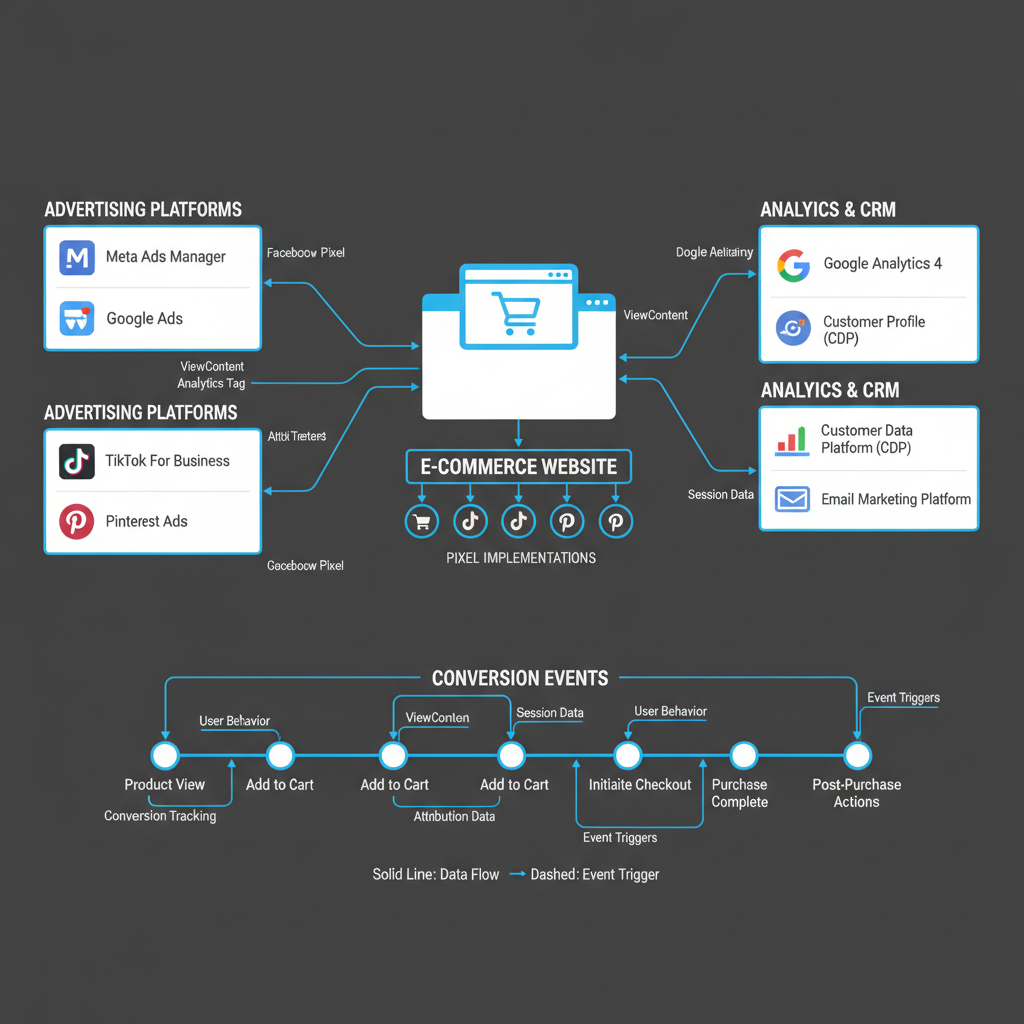
Accurate conversion tracking is the foundation of profitable ecommerce advertising. Without proper tracking, you're flying blind—unable to measure which campaigns drive sales, calculate true ROAS, or optimize bidding strategies effectively. Yet most ecommerce businesses struggle with tracking implementation, leaving revenue on the table through misattributed conversions, lost data, and suboptimal campaign decisions.
This comprehensive guide walks through complete conversion tracking setup for ecommerce stores across Meta, Google, and TikTok. You'll learn which events to track, how to implement pixels correctly, how to validate your tracking, and how to troubleshoot common issues that undermine tracking accuracy.
Whether you're launching your first ecommerce store or fixing tracking problems on an established business, this guide provides the technical knowledge and strategic framework for building tracking infrastructure that drives profitable growth.
Why Proper Tracking is the Foundation of Profitable Advertising
Before diving into implementation details, understand why conversion tracking deserves significant technical investment:
Accurate ROAS calculation: Without proper tracking, you can't calculate true return on ad spend, leading to budget misallocation and unprofitable scaling. Algorithm optimization: Platform algorithms require conversion data to optimize delivery. Incomplete tracking hobbles algorithmic learning, reducing campaign efficiency by 30-50% or more. Attribution clarity: Multi-touch customer journeys require sophisticated tracking to understand which touchpoints deserve credit for conversions. Budget allocation: Accurate conversion data enables strategic budget distribution across campaigns, ad sets, and platforms based on actual performance. Product-level insights: Proper ecommerce tracking reveals which products drive profitability, informing creative, targeting, and inventory decisions. Customer value tracking: Advanced implementations track customer lifetime value, enabling optimization beyond first-purchase ROAS.The cost of poor tracking is substantial. Undercounting conversions wastes budget on profitable campaigns paused prematurely. Overcounting conversions scales unprofitable campaigns that appear successful. Misattribution invests in the wrong channels, creative, or audiences.
Proper tracking implementation requires upfront technical investment but pays dividends throughout your advertising lifecycle. Prioritize tracking accuracy before scaling spend.
Essential Ecommerce Events to Track
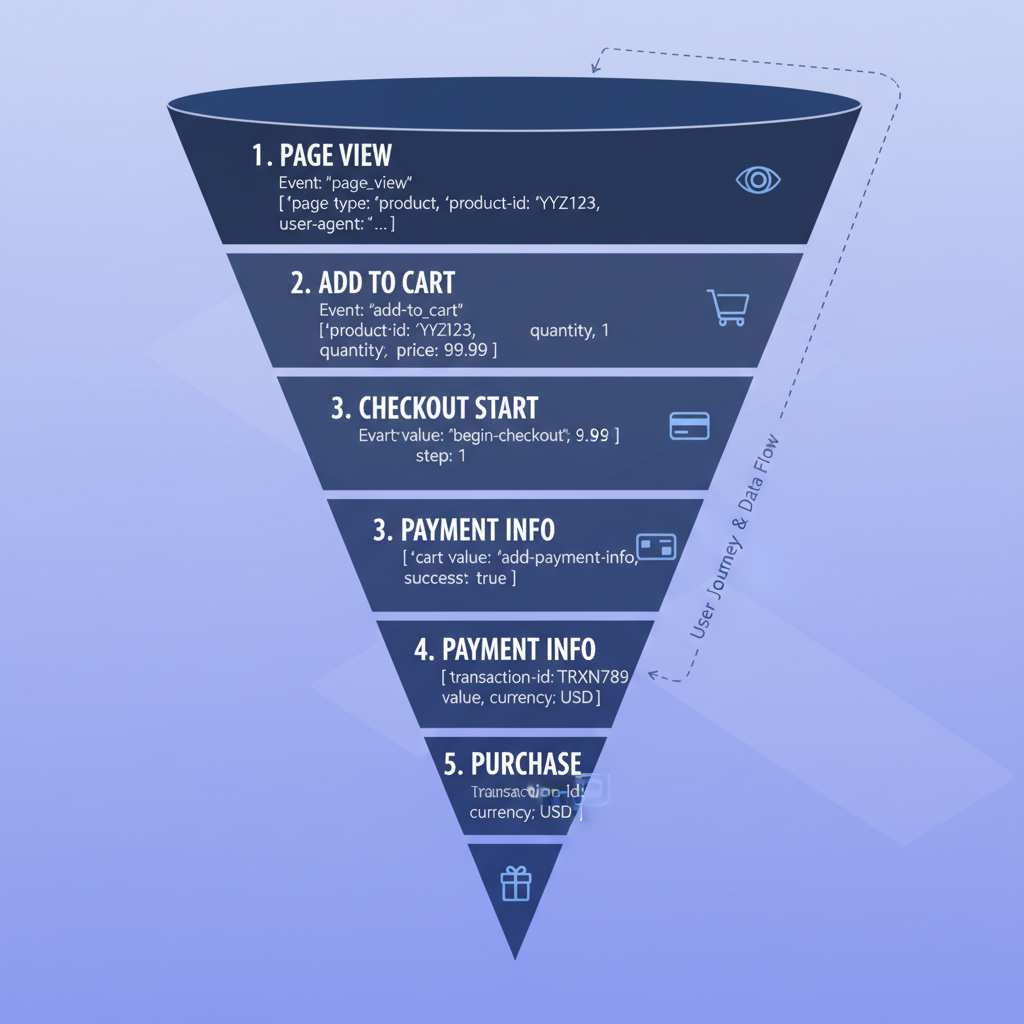
Comprehensive ecommerce tracking captures user behavior across the entire customer journey, not just purchases. This data enables sophisticated optimization strategies and reveals opportunities beyond bottom-funnel conversion.
Core Ecommerce Events (Required)
Every ecommerce implementation should track these fundamental events:
PageView: Fires when any page loads, establishing baseline traffic data. Required for remarketing audience building and attribution analysis. ViewContent: Triggers when users view product detail pages. Essential for product-specific retargeting and catalog optimization. AddToCart: Fires when users add products to their shopping cart. Critical for cart abandonment retargeting and conversion funnel analysis. InitiateCheckout: Triggers when users begin the checkout process. Identifies high-intent users for aggressive retargeting and measures checkout friction. Purchase: Fires upon successful transaction completion. The most critical ecommerce event, including transaction value and product details.These five events create the minimum viable ecommerce tracking implementation. Platform algorithms use this data to optimize delivery, build lookalike audiences, and attribute conversions correctly.
Advanced Ecommerce Events (Recommended)
Sophisticated implementations add these events for enhanced optimization:
Search: Captures on-site search queries, revealing user intent and product demand. Enables search-based remarketing and product strategy insights. AddToWishlist: Tracks wishlist additions, identifying interested users for future promotional targeting. ViewCategory: Fires when users browse category pages, enabling category-level remarketing and interest analysis. CompleteRegistration: Tracks account creation, valuable for lead generation analysis and customer acquisition cost calculation. AddPaymentInfo: Captures payment information entry, identifying users deep in checkout flow for immediate retargeting. Subscribe: Tracks newsletter or subscription signups, measuring lead generation parallel to ecommerce conversions.Advanced events provide granular optimization opportunities but require additional implementation effort. Prioritize core events first, adding advanced tracking as technical resources allow.
Event Parameters (Critical for Optimization)
Events without parameters provide limited optimization value. Include these parameters with every applicable event:
value: Transaction or predicted value in your account currency. Required for ROAS tracking and value-based optimization. currency: Three-letter currency code (USD, EUR, GBP). Ensures accurate value tracking across international campaigns. content_ids: Array of product IDs included in the event. Enables product-specific retargeting and catalog optimization. content_name: Product name or page title. Improves reporting clarity and enables name-based segmentation. content_type: Product type or category. Facilitates category-level analysis and targeting. num_items: Quantity of items in cart or purchased. Reveals order size patterns informing creative and offer strategies. contents: Array of objects with detailed product information (id, quantity, item_price). Supports advanced catalog features and dynamic ads.Without proper parameters, platform algorithms can't optimize effectively. An AddToCart event without product IDs and value is significantly less useful than one with complete parameter data.
Meta Pixel Implementation for Ecommerce
Meta's tracking ecosystem (serving both Facebook and Instagram advertising) offers multiple implementation methods with varying complexity and accuracy levels.
Meta Pixel Base Code Installation
Begin with base pixel code installation across all pages:
Step 1 - Generate Pixel Code: Access Meta Events Manager and navigate to your pixel. Copy the base pixel code, which includes your unique pixel ID. Step 2 - Install in Website Header: Add pixel code to your website's header section, appearing on every page. For custom websites, place code immediately after the opening- Shopify: Use Meta's official Shopify app for automatic installation
- WooCommerce: Install Meta for WooCommerce plugin
- Magento: Use Meta Business Extension
- BigCommerce: Install Meta Pixel app from marketplace
- Custom platforms: Manually add pixel code to header template
Base pixel installation enables basic tracking and remarketing pixel functionality. However, conversion tracking requires additional event implementation.
Standard Ecommerce Events Setup
Implement standard ecommerce events using one of three methods:
Method 1 - Automatic Events (Easiest): Enable automatic advanced matching and automatic events in Events Manager settings. Meta's pixel attempts to detect standard events automatically based on button clicks and form submissions. Accuracy: 60-70% for basic events Effort: Minimal Recommendation: Use only for testing, not production tracking Method 2 - Manual Event Code (Moderate): Manually place event code on specific pages or buttons: fbq('track', 'AddToCart', { value: 29.99, currency: 'USD', content_ids: ['product-123'], content_name: 'Blue Widget', content_type: 'product' }); Place this code where events should fire—on product pages for ViewContent, in cart modification functions for AddToCart, on thank-you pages for Purchase. fbq('track', 'AddToCart', { value: 29.99, currency: 'USD', content_ids: ['product-123'], content_name: 'Blue Widget', content_type: 'product' }); Place this code where events should fire—on product pages for ViewContent, in cart modification functions for AddToCart, on thank-you pages for Purchase. Accuracy: 85-95% when implemented correctly Effort: Moderate technical implementation Recommendation: Suitable for custom websites with development resources Method 3 - Ecommerce Platform Integration (Recommended): Use official platform integrations that automatically implement events:- Shopify: Meta for Shopify app handles all standard events automatically
- WooCommerce: Meta for WooCommerce tracks all events with product parameters
- Magento: Business Extension provides complete event tracking
- BigCommerce: Meta Pixel app includes automatic event implementation
Conversion API (Server-Side Tracking)
Meta's Conversion API sends conversion data server-to-server, improving accuracy and iOS 14+ resilience: Why Server-Side Tracking Matters: Browser-based tracking faces increasing limitations from ad blockers, privacy features, and cookie restrictions. iOS 14.5+ particularly impacts pixel accuracy. Conversion API bypasses these limitations by sending data from your server. Implementation Methods: Partner Integration: Many ecommerce platforms offer Conversion API integration through official apps or plugins. Shopify, WooCommerce, and major platforms support this with minimal technical configuration. Direct API Integration: For custom implementations, integrate Conversion API directly by sending HTTP POST requests to Meta's endpoint with event data. Requires server-side development expertise. Gateway Solutions: Third-party tag management platforms like Google Tag Manager Server-Side can facilitate Conversion API implementation without extensive custom development. Best Practice: Implement both pixel and Conversion API for maximum accuracy. Meta's deduplication automatically prevents double-counting when both methods report the same conversion.Advanced Matching Configuration
Advanced matching improves attribution accuracy by sending hashed customer information with events: Enable Advanced Matching: In Events Manager pixel settings, toggle on automatic advanced matching. This captures and hashes email addresses, phone numbers, names, and other identifiers from your website forms. Manual Advanced Matching: For custom implementations, include hashed customer data with events: javascript fbq('init', 'PIXEL_ID', { em: 'hashed_email', ph: 'hashed_phone', fn: 'hashed_firstname', ln: 'hashed_lastname' }); Privacy Compliance: Advanced matching hashes data before sending, maintaining user privacy while improving attribution. Ensure compliance with GDPR, CCPA, and other privacy regulations in your jurisdiction.Google Ads Conversion Tracking Setup
Google's advertising ecosystem includes multiple tracking methods for Search, Shopping, Display, and YouTube campaigns.Google Ads Conversion Tracking Tag
Implement Google Ads conversion tracking for all ecommerce conversion events: Step 1 - Create Conversion Actions: In Google Ads, navigate to Tools → Conversions → New Conversion Action. Create separate conversion actions for Purchase (primary) and optionally AddToCart, BeginCheckout, and other micro-conversions. Step 2 - Generate Conversion Tags: For each conversion action, Google generates a conversion tracking tag containing your conversion ID and label. Step 3 - Install Global Site Tag: Add Google's global site tag (gtag.js) to all website pages in the header section. This base tag enables conversion tracking and remarketing. Step 4 - Add Event Snippets: Place conversion event snippets on specific pages where conversions occur:- Purchase: Thank-you page after successful checkout
- AddToCart: Fire dynamically when cart modifications occur
- BeginCheckout: Checkout initiation page
Enhanced Ecommerce Tracking with Google Analytics 4
Google Analytics 4 (GA4) provides sophisticated ecommerce tracking integrated with Google Ads: GA4 Setup Benefits: Single implementation serves both analytics and advertising needs. Automatic event parameters support advanced bidding strategies. Cross-platform tracking (website and app) from unified interface. Implementation Steps: Step 1 - Install GA4 Property: Create GA4 property in Google Analytics and add measurement ID to website. Step 2 - Enable Ecommerce Events: Configure ecommerce events in GA4 using recommended event names (view_item, add_to_cart, begin_checkout, purchase). Step 3 - Link GA4 to Google Ads: In GA4 Admin, link your Google Ads account under Product Links. This shares conversion data automatically. Step 4 - Import GA4 Conversions: In Google Ads, import GA4 conversions as conversion actions for bidding optimization. Advanced Feature - Predictive Audiences: GA4's machine learning creates predictive audiences (likely to purchase, likely to churn) usable in Google Ads targeting.Google Shopping Feed Setup
Google Shopping campaigns require product feed configuration beyond conversion tracking: Product Feed Creation: Create structured product data feed in XML, TXT, or using Google Sheets. Include required fields: id, title, description, link, image_link, price, availability. Feed Upload: Upload product feed to Google Merchant Center. Configure automatic daily updates to maintain product data accuracy. Conversion Tracking Integration: Link Google Merchant Center to Google Ads. Shopping campaign conversions automatically track using your Google Ads conversion tracking implementation. Enhanced Conversions: Enable enhanced conversions in Google Ads to improve attribution accuracy by matching first-party customer data (hashed email addresses) with Google accounts.TikTok Pixel for Ecommerce Stores
TikTok's advertising platform uses a pixel implementation similar to Meta's approach:TikTok Pixel Installation
Step 1 - Generate Pixel Code: In TikTok Ads Manager, navigate to Assets → Events. Create a new pixel and copy the base pixel code. Step 2 - Install Base Pixel: Add TikTok pixel code to website header across all pages. For supported platforms:- Shopify: Install TikTok's official Shopify app
- WooCommerce: Use TikTok for WooCommerce plugin
- Other platforms: Manual code installation in header template
Standard Event Implementation
TikTok supports standard ecommerce events aligned with Meta's implementation: Automatic Events (Partners Only): TikTok's official platform integrations (Shopify, WooCommerce, etc.) automatically implement standard events with full parameters. Manual Event Code: For custom implementations, add event code where conversions occur: javascript ttq.track('AddToCart', { value: 39.99, currency: 'USD', content_id: 'product-456', content_name: 'Red Widget', content_type: 'product', quantity: 1 }); Required Events: At minimum, implement ViewContent, AddToCart, InitiateCheckout, and CompletePayment (TikTok's purchase event name). Event Parameters: Include value, currency, content_id, and quantity with all events. TikTok's algorithm requires these parameters for effective optimization.TikTok Events API (Server-Side)
Similar to Meta's Conversion API, TikTok offers server-side tracking via Events API: Implementation: Use TikTok's official platform integrations for automatic Events API setup, or implement custom server-side integration using TikTok's API documentation. Benefits: Improved tracking accuracy, iOS 14+ resilience, and enhanced attribution matching. Deduplication: Send event_id parameter with both pixel and Events API to prevent double-counting conversions.Server-Side Tracking Implementation

Why Server-Side Tracking is Essential
Browser Limitations: Ad blockers, cookie restrictions, and privacy features increasingly prevent browser-based pixels from firing accurately. iOS 14+ Impact: Apple's App Tracking Transparency framework severely limits pixel accuracy for iOS users, who represent 40-50% of mobile traffic for many ecommerce stores. Attribution Accuracy: Server-side tracking captures conversions that pixel-only implementations miss, improving ROAS accuracy by 15-30%. Privacy Compliance: Server-side implementations offer better control over data collection and sharing, simplifying GDPR, CCPA, and privacy regulation compliance.Server-Side Implementation Approaches
Tag Management Solutions: Google Tag Manager Server-Side, Segment, and Tealium offer managed server-side tracking infrastructure. These platforms receive events from your server, then distribute to advertising platforms. Direct API Integration: Implement platform-specific server-side APIs (Meta Conversion API, Google Enhanced Conversions, TikTok Events API) directly from your application server. Ecommerce Platform Apps: Major platforms (Shopify, WooCommerce, BigCommerce) offer apps handling server-side tracking automatically through platform integrations.Implementing Server-Side Tracking
Step 1 - Choose Infrastructure: Decide between managed tag management solution or direct API integration based on technical resources and complexity requirements. Step 2 - Event Forwarding Setup: Configure your server to send conversion events to advertising platforms when they occur (order completion, cart additions, etc.). Step 3 - Parameter Mapping: Ensure all required parameters (value, currency, product IDs, customer identifiers) pass from your server to advertising platforms. Step 4 - Deduplication Configuration: Send event_id or transaction_id with both browser and server events to prevent platforms from double-counting conversions. Step 5 - Testing and Validation: Verify server-side events appear in platform event testing tools and match browser-based event counts.Testing and Validating Your Tracking
Browser Extension Testing
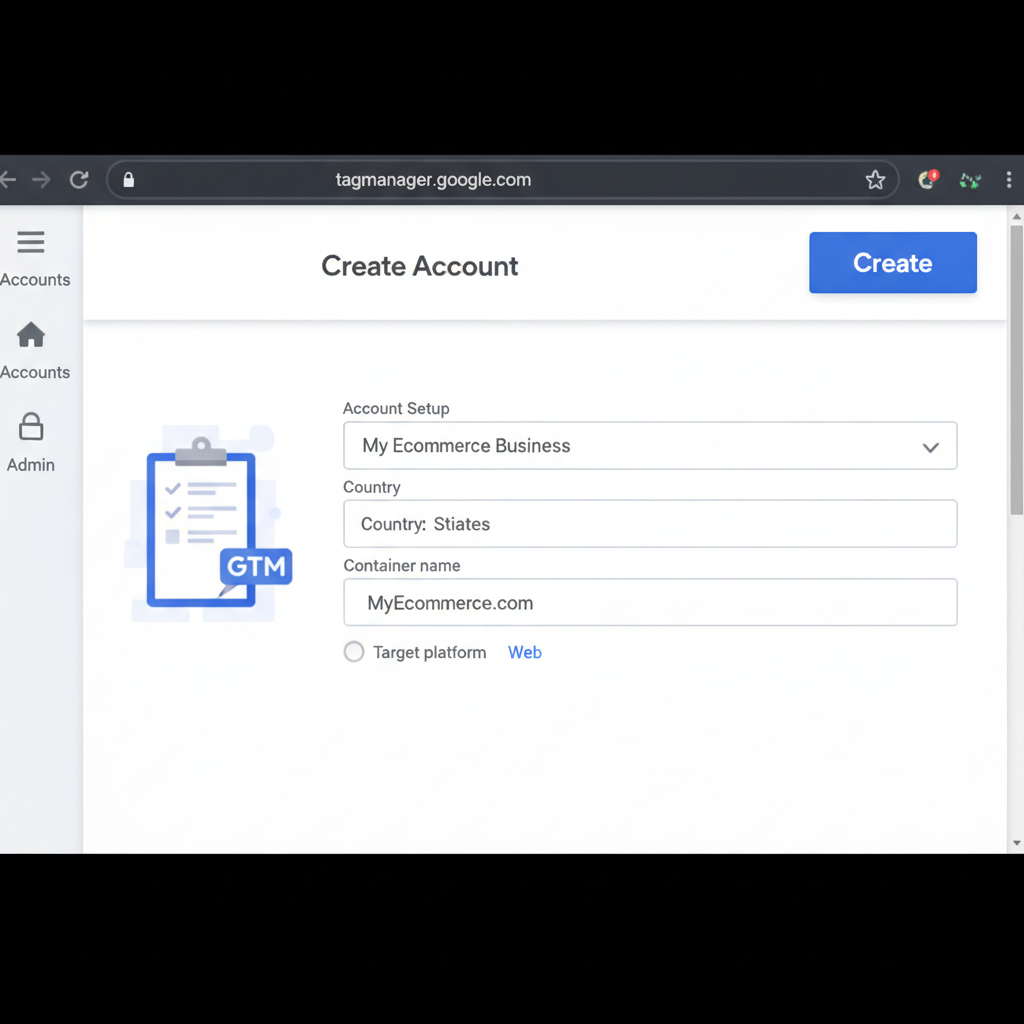
All major platforms provide browser extensions for real-time pixel debugging: Meta Pixel Helper: Chrome extension showing pixel fires, event names, and parameters. Identifies implementation errors, warnings, and tracking issues. Google Tag Assistant: Chrome extension validating Google tags including Google Ads conversion tracking and GA4 implementation. TikTok Pixel Helper: Chrome extension confirming TikTok pixel and event implementation. Testing Process: Install relevant extensions, navigate through your website's conversion funnel (product view → add to cart → checkout → purchase), and verify all events fire with correct parameters.Platform Event Testing Tools
Each platform offers event testing and validation tools in their advertising dashboards: Meta Events Manager - Test Events: Shows real-time event stream from your pixel and Conversion API. Navigate your website in one browser tab while monitoring Events Manager in another. Confirm all events fire with correct parameters. Google Ads - Conversion Tracking Status: Shows conversion tag status and recent conversion activity. Click "Check tag installation" to validate proper implementation. TikTok Events Manager - Test Events: Displays real-time event stream from pixel and Events API. Verify event parameters match expected values.End-to-End Purchase Testing
The most reliable validation involves completing real test purchases: Create Test Order: Navigate through your entire checkout process using a real payment method. Use minimal transaction value to reduce testing costs. Verify Event Chain: Confirm the complete event sequence fires correctly: PageView → ViewContent → AddToCart → InitiateCheckout → Purchase. Check Event Parameters: Verify purchase event includes accurate value, currency, transaction_id, and product information. Confirm Platform Reception: Check platform dashboards (Meta Events Manager, Google Ads Conversions, TikTok Events Manager) to confirm purchase event appears with correct attribution. Attribution Testing: If possible, click an actual ad before completing test purchase to verify end-to-end attribution works correctly. Perform test purchases across multiple browsers, devices (desktop, mobile), and platforms (iOS, Android) to ensure tracking works universally.Common Tracking Issues and Fixes
Even properly implemented tracking encounters issues requiring troubleshooting:Duplicate Conversions
Symptom: More conversions reporting than actual orders completed. Causes:- Users refreshing thank-you pages triggering multiple purchase events
- Both pixel and server-side tracking firing without proper deduplication
- Conversion tracking code placed on multiple pages instead of only thank-you page
- Implement transaction_id or event_id to deduplicate conversions
- Ensure purchase event fires only once per transaction
- Configure proper deduplication between browser and server-side events
Missing Conversions
Symptom: Fewer conversions tracking than actual orders completed. Causes:- Users with ad blockers preventing pixel from firing
- iOS 14+ tracking limitations
- Conversion tracking code not firing before user leaves thank-you page
- Server errors preventing thank-you page from loading
- Implement server-side tracking to capture blocked conversions
- Optimize thank-you page load speed to ensure tracking fires
- Add conversion event confirmation to order completion process
- Monitor server error rates affecting checkout completion
Incorrect Conversion Values
Symptom: Conversion values in platform reports don't match actual order values. Causes:- Static value hard-coded instead of dynamic transaction value
- Currency mismatch (tracking in different currency than account settings)
- Value including tax or shipping when it shouldn't (or vice versa)
- Value parameter not passing correctly from ecommerce platform
- Verify dynamic value parameter passes actual transaction total
- Confirm currency parameter matches platform account settings
- Define value consistently (including or excluding tax/shipping across all platforms)
- Test value accuracy with multiple test transactions at different amounts
Attribution Window Mismatches
Symptom: Same campaign shows different conversion counts across different platforms or reports. Causes:- Different attribution windows between platforms (Meta: 7-day click, Google: 30-day click)
- View-through attribution settings differing between platforms
- Reporting time zone differences
- Conversion date vs click date reporting
- Understand each platform's default attribution windows
- Adjust attribution settings for consistent cross-platform comparison
- Compare conversions by click date for more consistent metrics
- Accept some attribution variance as normal across platforms
Cross-Domain Tracking Issues
Symptom: Conversions on separate domain (checkout.yourstore.com vs www.yourstore.com) not attributing correctly. Causes:- Pixel not installed on checkout domain
- Cookie/session information not transferring between domains
- Referrer information lost during domain transfer
- Install all pixels on all domains in checkout flow
- Configure cross-domain tracking in pixel settings
- Use URL parameter passing to maintain attribution across domains
- Implement server-side tracking to bypass browser session limitations
Advanced: Enhanced Ecommerce Data Layer
For maximum tracking sophistication, implement a structured data layer:What is a Data Layer?
A data layer is a JavaScript object containing structured information about page content, user interactions, and ecommerce transactions. Tag management systems and tracking pixels read from this data layer rather than attempting to scrape information from page HTML. Benefits:- Single source of truth for all tracking implementations
- Easier tag management and tracking updates
- More reliable data collection
- Support for advanced ecommerce features (dynamic remarketing, Shopping campaigns)
Implementing Ecommerce Data Layer
Basic Structure: Create dataLayer object before any tracking tags load: javascriptwindow.dataLayer = window.dataLayer || [];Conclusion: Maintaining Accurate Tracking Over Time
Conversion tracking isn't a one-time implementation but an ongoing maintenance discipline. Tracking accuracy degrades over time without systematic monitoring and maintenance.
Establish monthly tracking audits reviewing these elements:
Conversion Count Verification: Compare platform-reported conversions against actual orders from your ecommerce platform. Investigate discrepancies exceeding 5%. Value Accuracy: Verify total conversion value across platforms matches actual revenue from advertising traffic. Event Parameter Quality: Spot-check that product IDs, categories, and other parameters populate correctly in platform event reporting. Test Purchase Validation: Complete test purchases quarterly to confirm end-to-end tracking continues functioning correctly. Platform Update Monitoring: Subscribe to platform change announcements and test tracking when platforms release significant updates.Tracking implementation requires significant upfront investment but provides the foundation for all profitable advertising decisions. Prioritize tracking accuracy before scaling spend. Use UTM parameters alongside pixel tracking for additional attribution visibility. Monitor your ROAS confidence knowing your tracking infrastructure provides accurate conversion data.
The difference between profitable and unprofitable ecommerce advertising often comes down to tracking accuracy. Invest in proper implementation, maintain tracking discipline, and reap the rewards through better optimization, smarter budget allocation, and confident scaling decisions.