Multi-Platform Ad Budget Allocation: Your Ecommerce Launch Strategy
You're about to launch your ecommerce campaign across multiple platforms.
And you're staring at a budget that needs to stretch across Meta, Google, TikTok, maybe Pinterest.
Here's the question that keeps you up at night: how much goes where?
Get it wrong and you'll burn through cash on platforms that don't convert. Or worse—you'll underfund the channels that could've scaled your business.
The 70-20-10 Rule That Actually Works
Most ecommerce brands overthink budget allocation. They split everything evenly, hoping something sticks.
That's expensive guesswork.
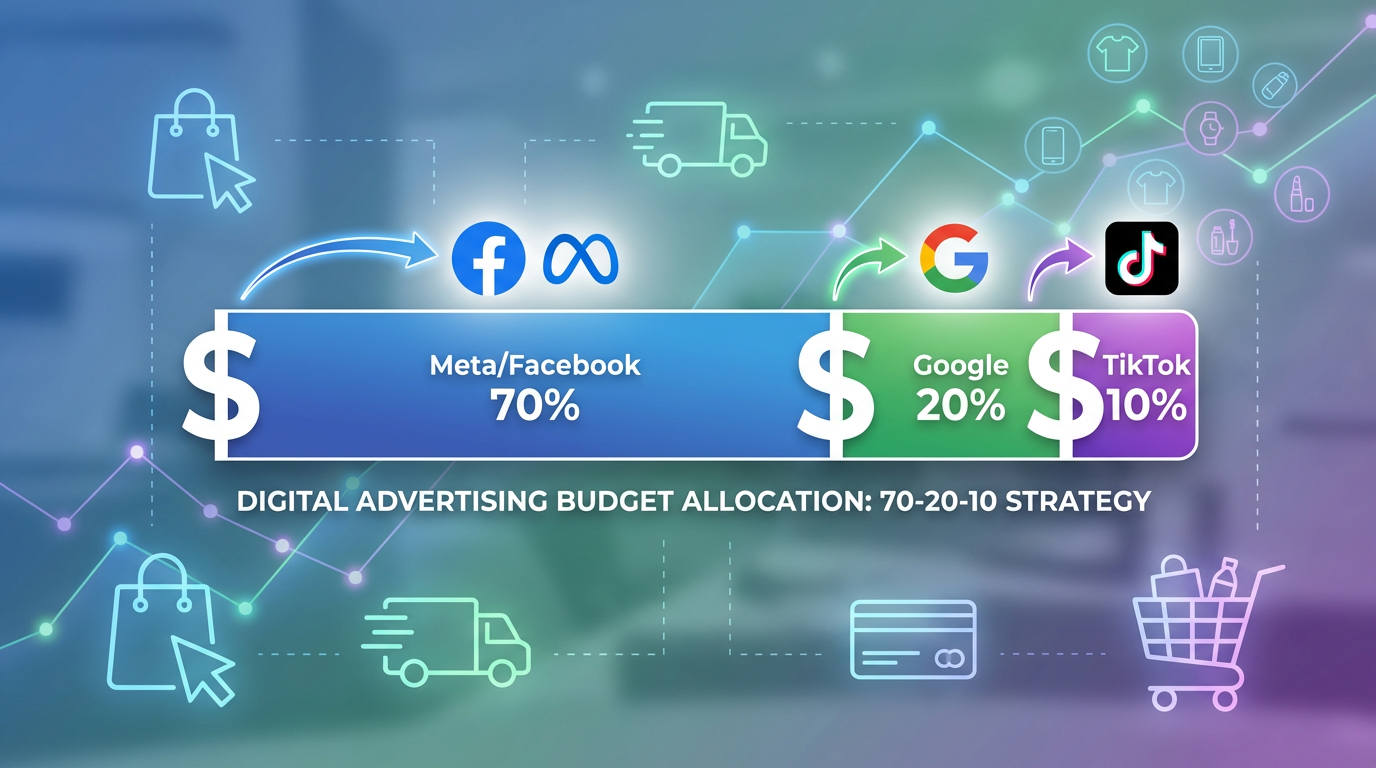
The 70-20-10 distribution rule gives you a framework that's proven across thousands of launches. Here's how it breaks down: 70% goes to your primary platform, 20% to your secondary channel, and 10% to experimental testing.
Why this split? Because you need concentration to generate meaningful data. Spreading $3,000 equally across five platforms gives you $600 per channel—that's barely enough to exit the learning phase on Meta, let alone gather statistically significant conversion data.
But there's nuance here. Your primary platform isn't just the one you like best—it's the channel where your target audience actually spends time and makes purchase decisions. For fashion brands targeting women 25-45, that's typically Meta (Instagram specifically). For B2B ecommerce selling professional tools, Google Shopping dominates. For Gen Z beauty products, TikTok converts at rates that make other platforms look sluggish. Not sure which platform fits your audience best? Use our Platform Comparison Tool to evaluate targeting capabilities, typical audience demographics, and conversion patterns for each channel.
The 70% concentration lets you push past the learning phase quickly. Most platforms need 50 conversions per week to optimize effectively; your primary channel should hit that threshold within 10-14 days.
Your 20% secondary budget serves a different purpose. It's not experimental—it's strategic diversification. This goes to the platform with your second-highest audience concentration, giving you a backup revenue stream and comparative data. When your primary channel hits saturation (and it will), you'll already have a scaled secondary channel ready.
That final 10%? Pure testing. New platforms, different ad formats, audience experiments you're not confident about yet. This budget is designed to fail—or to discover your next primary channel.
Platform-Specific Starting Budgets That Generate Data
Let's talk real numbers.
Meta requires a minimum daily budget of $50-70 per ad set to generate meaningful data. Go lower and you're stuck in perpetual learning mode—the algorithm never gathers enough signals to optimize. For a proper Meta launch, you need at least $500-700 weekly to run 2-3 ad sets simultaneously. To understand how these budget requirements compare across platforms and what performance to expect at different spend levels, check our Advertising Benchmarks.
That's your entry point. Not recommended—required.
Google Shopping campaigns need different math. Because you're bidding on specific product searches, you need enough budget to capture 30-50 clicks daily. Depending on your product category, that's $30-100 per day. Beauty products with $1.20 CPCs? Budget $50 daily. Furniture with $3.50 CPCs? You're looking at $150-200 daily minimum.
TikTok's algorithm is hungrier. The platform recommends $70-100 daily per campaign to exit learning phase within a week. Go cheaper and you'll spend three weeks gathering data instead of one—you're not saving money, you're delaying results.
Pinterest sits lower on the budget requirement scale: $25-40 daily generates sufficient data for most ecommerce categories. The platform's longer conversion window (7-30 days typically) means you need patience more than massive budgets.
Here's what this means practically. If you've got $5,000 monthly for a multi-platform launch, your allocation might look like this: Meta gets $3,500 (70%), Google Shopping gets $1,000 (20%), and TikTok testing gets $500 (10%). Each platform receives enough budget to actually work.
Use our Budget Allocator to calculate optimal budget distribution across your advertising platforms.
The Daily Minimum That Everyone Ignores
There's a threshold below which you're not running ads—you're burning money without data.
Every platform has a daily minimum that triggers algorithmic optimization. Drop below it and you're essentially invisible; the algorithm can't gather enough signals to improve your delivery.
Meta's practical minimum is $20 per ad set daily. Yes, you can technically run ads for $5 daily—but you'll see impressions twice a week. That's not a campaign; that's a lottery ticket.
Google's minimum varies by competition level. Low-competition niches might work at $15 daily. High-competition categories (supplements, fashion, electronics) need $50+ daily or your ads barely show.
TikTok won't tell you this directly, but campaigns under $50 daily rarely exit learning phase. The platform's documentation says "no minimum," but the algorithm's behavior tells a different story. Under $50 daily, you're looking at 3-4 weeks to gather optimization data—by then, your creative's stale.
This creates a critical decision point. If you can't meet the daily minimum for a platform, don't run there yet. Save your budget, concentrate it where you can afford proper testing, and expand later. Five platforms at $10 daily each generates zero useful data; one platform at $50 daily starts building real insights within days.
Calculate your platform-specific daily minimums with our Daily Budget Calculator.
When to Shift Budget Between Channels (And When to Wait)
You've been running for two weeks. Meta's crushing it with a 3.2 ROAS while Google's limping along at 1.4.
Time to shift budget, right?
Maybe. Maybe not.
The biggest mistake in multi-platform management is reacting too quickly to performance differences. Different platforms have different conversion windows—Meta typically converts within 1-3 days, Google Shopping within 1-7 days, Pinterest within 7-30 days. Comparing them at the two-week mark is comparing apples to oranges to pineapples.
Here's the framework: don't shift budget until each platform has exited learning phase AND run for a full conversion cycle. For most ecommerce, that's 3-4 weeks minimum.
But once you've got clean data, the shift signals become clear. If one platform consistently delivers ROAS 40% or higher than another after 30 days, reallocate 10-15% of budget from the underperformer. Not all at once—gradual shifts prevent you from killing a channel right before it scales.
Watch for these specific triggers. If your primary platform's frequency hits 3.5+ and ROAS drops 20% week-over-week, you're hitting audience saturation—shift 15-20% to your secondary channel immediately. If your experimental platform delivers ROAS within 20% of your primary channel for two consecutive weeks, it's graduated from experiment to secondary channel.
Seasonal factors matter more than most brands realize. Google Shopping typically strengthens in the final 10 days before major holidays as purchase intent spikes; Meta performs better in the awareness phase 3-4 weeks before holidays. Shifting budget to match these cycles can improve overall ROAS by 15-25%.
The other direction matters too. If a platform's ROAS drops below your breakeven threshold for 10 consecutive days despite creative refreshes and audience adjustments, cut budget by 50% immediately. Don't ride it hoping for recovery—that's how $10,000 budgets evaporate with nothing to show.
Using Budget Allocation Tools Without Losing Your Mind
Spreadsheets work until they don't.
Most ecommerce brands start with manual tracking: daily budget checks, weekly performance reviews, monthly reallocation decisions. That's fine for single-platform campaigns or small budgets under $3,000 monthly.
But once you're running multiple platforms with $5,000+ monthly spend, manual allocation becomes a liability. You're making budget decisions on 3-day-old data, missing optimization windows, and spending 6-8 hours weekly just tracking numbers.
Budget Allocator tools automate the math you should be doing daily but probably aren't. They pull real-time performance data from all platforms, calculate ROAS by channel, and recommend budget shifts based on actual conversion data—not gut feeling.
The key is setting them up correctly. Most tools let you define your ROAS targets by platform (Meta might be 2.5, Google 2.0, TikTok 2.2), your minimum daily budgets (so the tool doesn't recommend dropping Meta to $5 daily), and your reallocation frequency (weekly shifts work better than daily for most ecommerce).
Here's what good automation looks like: the tool identifies that Google Shopping's ROAS jumped from 1.8 to 2.6 over five days, recommends shifting $300 from Meta's $1,500 weekly budget to Google's $600 budget, and flags that Meta's frequency is climbing—suggesting creative refresh alongside the budget cut.
What it shouldn't do: make changes automatically without your review. Budget allocation tools should recommend, not execute. You need human judgment to account for factors the algorithm can't see—upcoming product launches, seasonal trends, creative pipeline limitations.
The best approach combines automated tracking with manual decision-making. Let the tools handle data aggregation and mathematical modeling. You handle strategic decisions about when to scale, when to cut, and which platforms align with your business goals beyond pure ROAS.
Related Tools: Budget Allocator, Daily Budget Calculator, ROAS Calculator, CPM Calculator, CPA Calculator.